














11.1 Frontend Architecture (ReactJS)
TradeView’s frontend is engineered to deliver a CEX-grade trading experience within a decentralized, real-time environment. Built on a high-performance ReactJS stack, the frontend prioritizes speed, modularity, responsive interactivity, and resilience across devices and network conditions.
This section outlines the complete technology stack, UI component architecture, and performance optimizations that underpin the frontend layer of TradeView.
11.1.1 Core Tech Stack
TradeView's frontend architecture leverages a combination of modern web development tools to ensure robust performance, seamless data hydration, and extensibility for future modules. The stack was chosen based on criteria including render efficiency, developer ecosystem maturity, and compatibility with blockchain-based real-time data sources.
| Component | Stack / Tooling |
|---|---|
| UI Layer | ReactJS with functional components and hooks |
| State Management | Zustand for lightweight local state + React Query for server-side sync |
| Real-time Data Handling | Dual-layer with native WebSocket connections (price feeds, positions, order books) and REST API fallback with interval polling logic |
| Styling Engine | TailwindCSS + shadcn/ui component framework for fast styling and accessibility compliance |
| Animations | Framer Motion for micro-interactions and page transitions |
| Charts & Visualization | Recharts and D3.js for performance dashboards, trade charts, PnL overlays |
| Build & Deployment | Vite + ESBuild for optimized asset bundling and minimal time-to-first-byte (TTFB) |
Highlights:
-
Code-splitting and route-based lazy loading are used to reduce first-paint latency.
-
Skeleton placeholders load during async fetches to prevent layout jank.
-
Dark/light mode support is native and configurable at user/session level.
11.1.2 Modular UI System
All UI components are atomic and composable. These elements are broken down into granular, reusable components that can be rendered independently or composed into complex modules.
Key Composable Modules:
-
Trade Panel: Real-time display of selected pair, slippage, execution speed, funding rate.
-
Smart Order Forms: Dynamic order entry panel with embedded leverage, margin mode (cross/isolated), slippage, and TP/SL settings.
-
Funding Rate & Liquidation Risk Bars: Positioned for quick-glance insights into risk level and time-sensitive actions.
-
Vault Management Panels: Dedicated interface for copy-trading actions, with follower stats, open trades, and performance visualization.
-
Notification & Alerts System: Real-time inbox showing position updates, liquidation warnings, quest completions, and strategy alerts.
-
Gamification Trays: Slide-in drawers showcasing user XP, seasonal achievements, and progression toward the next tier.
Reusability Across Platforms:
-
Components are platform-agnostic and can be reused across the mobile web version and native mobile apps.
-
Business logic is abstracted into shared hooks and custom Zustand stores, decoupling UI from logic and reducing bugs.
11.1.3 Real-Time Responsiveness
-
All position, order book, and vault analytics updates are served via:
-
WebSocket multiplexing for low-bandwidth, high-frequency data
-
Local state caching for seamless UX under network jitter
-
Optimistic UI transitions on order submit, position edit, etc.
-
-
Manual reloads are never required; updates reflect in <200ms round-trip time in normal conditions.
11.1.4 Developer Tooling & Extensibility
The frontend is:
-
Fully componentized with TypeScript typings
-
Built for extension via plug-and-play:
-
New asset listings
-
Custom dashboards
-
Strategy plugins
-
-
Open to DAO contributors (governance-controlled frontend repo)
Future versions may support:
-
Skin/themes via on-chain profile settings
-
WASM-based plugins for analytics overlays
11.2 Mobile-Responsive Trading UI
As a platform targeting global, mobile-first traders, TradeView emphasizes a mobile-first philosophy in its core product design. Many users—especially in emerging markets—prefer using browser-based mobile interfaces over desktop or native apps due to convenience, data cost, and ease of onboarding. Recognizing this, TradeView has built a fully-featured Progressive Web App (PWA) with complete trading capabilities, real-time responsiveness, and UX parity with the desktop interface.
The mobile web UI supports all protocol functionality, including copy-trading, vault management, trading competitions, real-time alerts, and AI-powered insights. It is intentionally engineered for low-latency performance, thumb-oriented usability, and cross-device continuity, making it one of the most comprehensive PWA implementations in Web3 trading.
11.2.1 Progressive Web App (PWA) First Design
TradeView’s mobile experience is not a “lite” version of the desktop site. It is a complete, responsive interface that runs seamlessly within the mobile browser, with offline capability, deep linking, and OS-native integrations.
- PWA Design Objectives:
-
No App Installation Required: Users can access all trading, social, and vault features instantly through their mobile browser—removing friction from onboarding.
-
Offline Access: Through service workers and cache-first routing, previously loaded trading pairs, vault dashboards, and AI alerts are accessible even without connectivity.
-
Performance Mirroring Native:
-
Virtualized Scrolling: Infinite scrolling across vaults, positions, and notifications is achieved with minimal memory footprint.
-
Touch-Native Components: Swipable tabs, gesture-driven bottom drawers, and floating buttons mimic native mobile UX standards.
-
Responsive Layouts: The design automatically adapts down to 360px screens, ensuring compatibility with small-screen Android devices.
-
- Optimization Highlights:
-
Dynamic Module Chunking: Only the required UI components are loaded on entry to reduce first-load time.
-
Pre-connection to Wallet Providers: MetaMask, WalletConnect, and embedded custodial flows initialize in advance during onboarding, ensuring seamless login on revisit.
-
Light/Dark Auto Switching: UI theme adapts based on OS preferences and can be toggled via user profile.
11.2.2 Core Features in Mobile Mode
All key trading and social functions of TradeView are 100% supported in mobile mode, with no downgrade in capabilities or features.
| Feature | Mobile Web | Desktop Web |
|---|---|---|
| Full Trading Interface (Limit/Market/SL/TP) | ✅ | ✅ |
| AI Insights & Risk Panel | ✅ | ✅ |
| Vault Management & Copy UI | ✅ | ✅ |
| Gamified Profile / XP / Badges | ✅ | ✅ |
| Trading Competitions Leaderboards | ✅ | ✅ |
| Real-Time Notifications (Popup + Inbox) | ✅ | ✅ |
- Mobile-Specific Optimizations:
-
Tap Radius Resizing: All interactive elements are enlarged and spaced for optimal thumb access, reducing mistaps on high-leverage trade forms.
-
Persistent Bottom Navigation: Mobile users navigate using a fixed tab bar (e.g., Trade, Vaults, Alerts, Profile) for single-hand use.
-
Adaptive Charting: PnL and order book charts compress and reflow under the trade box, maintaining visibility without needing to scroll away from the execution area.
-
Sticky Action Buttons: Trade execution and “Copy Vault” actions remain visible even during long scroll sessions.
11.2.3 Deep-Linking and Session Persistence
To support viral growth, referral campaigns, and real-time re-engagement, the mobile web experience incorporates deep-linking and persistent session context across multiple entry points.
- Deep-Link Entry Points:
-
Twitter or Discord Vault Links: Clicking a vault share link opens directly to the correct vault page, with trader stats, copy button, and synced context.
-
Referral Campaigns: New users clicking shared invite links are taken to an auto-customized onboarding screen, pre-filled with inviter info and intended actions.
-
AI Alert Push or Telegram Bot Messages: Clicking a trade suggestion opens the associated vault or pair panel, maintaining wallet and session context.
- Session & Wallet Handling:
-
Preserved Login State: Users re-entering from a deep link automatically reconnect to their wallet (custodial or non-custodial), with fallback prompts if a reconnection is needed.
-
Pre-Filled Trade Flows: If a user clicks a link related to a strategy, vault, or specific trade type (e.g., long ETH with 5×), the trade form is auto-filled.
-
Journey-Based Onboarding: First-time visitors from a vault link see a simplified journey:
-
Overview of trader
-
Copy preview & ROI highlights
-
Quick signup (email or wallet)
-
Trade copy confirmation
-
This logic drastically reduces onboarding friction while preserving intent—even across app switches, tab closings, or device changes.
Summary: Mobile Web UX Strategy
| Principle | Implementation |
|---|---|
| Fully-Featured PWA | Works offline, install-free, with trading, vaults, and social UI |
| Touch-Optimized UX | Thumb-friendly sizing, swipe gestures, sticky CTAs |
| Deep-Link Support | Vault links, AI alerts, referrals open precise UI targets |
| Wallet Session Persistence | Auto-reconnects users, maintains trade form or vault view |
| No Feature Downgrade | Full parity with desktop, with mobile-specific enhancements |
11.3 Native Mobile App Strategy
While TradeView’s web app provides a responsive, fast, and fully-featured experience, a dedicated native mobile app for iOS and Android is essential for capturing real-time, always-on trader engagement—especially in the context of on-chain alerts, social interactions, and biometric-secured account access.
The TradeView mobile app is being designed to offer full parity with the web platform, while introducing mobile-native advantages such as push notifications, offline mode, and device-level security features. The goal is to ensure that mobile-first traders can engage with the protocol with zero compromises on security, functionality, or UX smoothness.
11.3.1 Native App Objectives
TradeView's mobile strategy focuses on delivering a trusted, real-time, and secure trading experience that exceeds the capabilities of Progressive Web Apps (PWAs). The app is designed for power users, vault followers, and DAO participants who need 24/7 market responsiveness.
- Core Objectives:
-
Real-time Native Push Notifications: Enables alerts for trade execution, liquidation proximity, vault sync delays, new AI insights, and leaderboard milestones. OS-level integration ensures alerts are delivered even when the app is closed.
-
Biometric Authentication: FaceID, TouchID, or Android biometrics are used to unlock wallets, approve copy trades, or access sensitive dashboards.
-
Offline Vault Management: Users can review past vault trades, replay strategy sequences, and queue copy trades even in low-connectivity zones. Transactions are signed and queued for later submission.
-
Voice-Based Alerts (Roadmap): Integration with native text-to-speech libraries will allow AI risk modules to push voice alerts like: “ETH vault at 92% margin usage – consider reducing position”.
-
Unified Codebase via React Native + Expo: TradeView uses the same modular logic layer (hooks, Zustand stores, utility modules) across web and mobile—enabling consistent features and faster updates across platforms.
11.3.2 Feature Coverage Matrix
To ensure seamless parity between mobile and web platforms, all core trading and vault management functions are fully supported on the native app, with certain features offering enhanced performance or additional capability via native integration.
| Feature | Native App | Web App |
|---|---|---|
| Trading Execution | ✅ | ✅ |
| Copy Vault Management | ✅ | ✅ |
| Referral Tracking & PnL Sharing | ✅ | ✅ |
| Leaderboard Browsing & Filtering | ✅ | ✅ |
| AI-Based Risk / Insight Alerts | ✅ (Push + Voice-ready) | ✅ (Popup only) |
| Chat & Social Trading Rooms | ✅ (in roadmap) | ❌ |
| Seasonal Quest & XP Dashboard | ✅ | ✅ |
| AR-Based Strategy Visualizations | 🚧 (in R&D) | ❌ |
Future versions may introduce optional Native Token-locked modules for power users, including vault clustering heatmaps, real-time whale alerts, and on-chain strategy playback.
11.3.3 Mobile Security Features
Mobile applications present a unique set of challenges in Web3—particularly when combining custodial access (email login) with non-custodial wallets (MPC or EOA). TradeView addresses this through a multi-layered mobile security stack:
Security Modules:
-
Secure Enclave Integration: On supported devices (iPhone and modern Android), signing keys for custodial flows are abstracted and stored within secure enclaves—ensuring they never leave the device.
-
Session Pinning and Management: Users can manage their active sessions across devices, with the ability to sign out from all devices remotely via the dashboard or support team.
-
Root/Jailbreak Detection: TradeView scans for jailbroken/rooted devices and automatically disables trading functionality or copy trade execution to prevent exploits.
-
Biometric-Only Transaction Approval (Optional): Users can enable a mode where copy trade approvals or vault staking require biometric confirmation—adding a non-exportable second factor.
These features are especially critical for onboarding users via email/password-based key abstraction, as these users do not use MetaMask or WalletConnect, and require advanced safeguards by default.
Summary: Native Mobile Strategy
| Objective | Implementation |
|---|---|
| Real-time responsiveness | Push notifications, biometric unlocking, offline mode |
| UX parity with web | Shared logic base via React Native + Zustand |
| Platform-specific enhancements | AI voice alerts, AR vault visualizations, chatrooms (in roadmap) |
| High-end mobile security | Secure Enclave, jailbreak detection, biometric approvals |
| Custodial and non-custodial support | Abstracted key storage + optional wallet connect + email login flow |
11.4 Dashboard Features
TradeView’s dashboard architecture is engineered to merge performance analytics, vault strategy monitoring, social discovery, and gamified metrics into a single unified interface. It adapts intelligently to user experience level and interaction style—offering both beginner-friendly summaries and professional-grade data depth.
11.4.1 Unified Dashboard Philosophy
The TradeView dashboard serves as the central intelligence layer of the trading experience—designed to bring clarity, personalization, and actionable insight to all users across skill levels and roles. More than just a collection of stats, the dashboard is a dynamic control center that adapts to a user's activity profile, system role, and current trading state.
Functional Scope
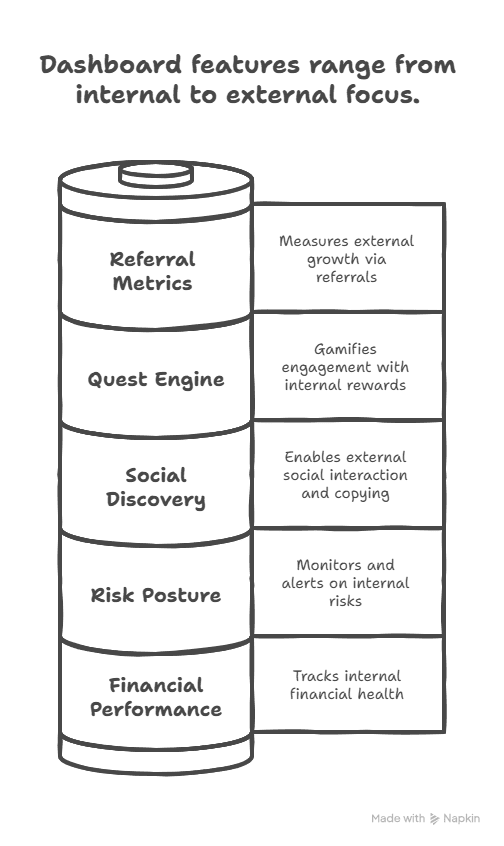
The dashboard provides deep, real-time visibility into:
-
Financial Performance:
-
Real-time and historical P&L tracking (absolute and percentage terms)
-
Visualized drawdowns, win/loss ratios, realized vs unrealized returns
-
Aggregated vault performance and follower ROI tracking (for strategists)
-
-
Risk Posture & Alerts:
-
Active position health: margin ratio, liquidation proximity, leverage ratio
-
Funding fee exposure, slippage anomalies, and oracle discrepancies
-
Smart risk flags (e.g., “high volatility detected” or “under-collateralized vaults”)
-
-
Social Discovery & Copy-Trading:
-
Followed vault stats, strategist reputation, vault rankings by ROI or TVL
-
Vault join/exit flows, history of copied trades, and performance deltas
-
-
Quest & XP Engine:
-
Active quest cards (daily/weekly/event-based)
-
XP accumulation bar and badge progression view
-
Tier unlocks and seasonal reward eligibility
-
-
Referral & Loyalty Metrics:
-
Direct and indirect referral volumes
-
Loyalty multipliers, seasonal boosts, and reward history
-
Role-Specific Adaptability
To avoid information overload while maintaining power-user functionality, the dashboard auto-adjusts based on the user’s role:
-
Copy-Traders:
-
See real-time vault stats, AI-based risk alerts, exit suggestions, and fee breakdowns.
-
Interface highlights follower ROI vs strategist ROI to expose slippage or copy lags.
-
-
Strategists & Vault Creators:
-
Access vault dashboards with rebalancing tools, follower composition, AUM trends.
-
Claim performance fees, track fee history, and view leaderboards for strategy ROI.
-
-
Casual Users & Newcomers:
-
Onboarding cards, simplified wallet health view, and AI tooltips guiding first actions.
-
Suggested quests and trading goals to build familiarity and earn XP.
-
Core Design Principles
TradeView’s dashboard architecture is built upon the following UI/UX and system-level foundations:
-
Modular Layout with Collapsible Sections:
-
Cards can be rearranged, hidden, or expanded for deeper inspection.
-
Grid adapts to mobile and desktop seamlessly with sticky performance headers.
-
-
Session Hydration with Pre-Fetched Data:
-
Instant load from browser-local cache (for active session data)
-
Minimal API latency via GraphQL and selective cache invalidation
-
-
Visual Emphasis on Signal:
- Rather than raw data dumps, key signals (e.g., risk flags, trade anomalies, XP triggers) are emphasized visually through color-coded cards, sparklines, and badge overlays.
-
AI-Enhanced Insights:
-
AI summaries suggest behavioral improvements (e.g., diversify exposure, reduce leverage)
-
Anomaly flags highlight statistically rare events in the user’s trading pattern
-
Predictive XP models recommend quests aligned with user history
-
TradeView’s unified dashboard turns complex perpetual trading data into a personalized command center, helping every user—from beginner to pro—optimize strategy, reduce risk, and engage with the ecosystem more intelligently.
11.4.2 Core Modules & UI Cards
Each module in the dashboard represents a self-contained, smartly rendered interface card. These modules give users a full snapshot of their trading life cycle, performance, and gamified progression.
| Module | Description |
|---|---|
| Performance Overview | P&L breakdown (realized/unrealized), win rate, drawdown analysis graph |
| Position Monitor | Active positions, margin usage, funding estimates, liquidation thresholds |
| Vault Holdings | Copy vault ROI, vault health, rebalancing options, exit indicators |
| AI Recommendations | Smart suggestions like “Reduce leverage,” “Diversify exposure,” “Exit vault” |
| Leaderboard Snippets | Real-time rank, peer comparison, profile score insights |
| Quest Progress | XP timeline, completed quests, next rewards, seasonal score |
| Referral Summary | Referred volume, fee shares, upcoming tier multiplier status |
-
*Performance Overview* Displays both realized and unrealized profits and losses, broken down by time period (24h, 7d, lifetime).
Includes win/loss ratio, average trade duration, and cumulative drawdown curve.
Helps users assess consistency, volatility exposure, and strategy sharpness. -
*Position Monitor* Shows all open positions with key risk metrics: margin usage %, funding rate predictions, liquidation buffer in % or $ terms, and real-time notional size.
Users receive color-coded warnings (e.g., red when <5% liquidation buffer) and optional AI-based stress alerts. -
*Vault Holdings* Lists vaults the user has copied or created, with individualized PnL, vault status (open/paused), and rebalancing tools.
Users can auto-exit, update strategy preferences, or benchmark their vault performance vs. similar ones. -
*AI Recommendations* AI agents suggest user-specific actions based on risk posture and historical behavior (e.g., “Trim BTC long; over 3× exposure” or “ETH-BTC vault underperforming peers”).
These suggestions appear contextually during volatile periods or milestone crossings (e.g., XP rank-up). -
*Leaderboard Snippets* Compact widgets showing:
-
Current leaderboard rank.
-
Top 3 traders with similar risk profiles.
-
Vaults trending in user’s preferred asset category.
Tap-through expands into full leaderboard with filters like Sharpe ratio, streaks, or TVL growth.
-
-
*Quest Progress* Tracks active and completed quests, XP milestones, and upcoming unlocks.
Includes timers for time-limited missions and links to directly act on pending tasks (e.g., “Trade in a volatile asset now”). -
*Referral Summary* Displays real-time tracking of:
-
Referral count (direct + indirect).
-
Volume generated through network.
-
Earned and pending fee rebates.
Also includes a tier progression bar showing proximity to next reward level.
-
11.4.3 Customization & Role-Based Views
TradeView’s dashboard is designed to adapt based on user type, experience level, and interaction history. This adaptive rendering ensures that both newcomers and advanced traders engage with the protocol efficiently—without being overwhelmed or restricted.
Each user role activates a tailored dashboard layout composed of pre-configured modules, tooltips, and optional advanced views:
A. New Traders (First-Time or Low-XP Users)
Objective: Simplify onboarding and prevent data overload.
-
Simplified Trading Panels: Minimalist UI showing only essential metrics (PnL, margin ratio, and position size).
-
AI-Guided Tooltips: Real-time contextual hints (e.g., “You’re using 5× leverage on a high-volatility pair. Consider hedging.”).
-
Quest Starter Cards: Pre-highlighted beginner quests with 1-click activation.
-
Vault Suggestion Strip: Recommends low-volatility or beginner-friendly copy vaults based on trading history.
-
Gamified Onboarding Tray: Progress bar showing XP milestones for first 7 days with links to tutorials and academy content.
B. Intermediate or Power Traders (Gold–Platinum Tiers)
Objective: Provide analytical depth and real-time control over strategy.
-
Advanced Analytics Charts:
Toggleable overlays for Sharpe ratio, ROI vs benchmark, unrealized funding exposure, trade streaks. -
Position Granularity Toggle: Drill into per-trade data, liquidation trails, and past margin movements.
-
Smart Alerts Control Panel: Customize triggers for AI notifications (e.g., “Ping me if BTC vault drops >10% in 1hr”).
-
Leaderboard Watchlist: Add specific traders or vaults to a personal watchlist with PnL sync and copy toggle.
-
Batch Vault Monitoring: Table view of all followed vaults with last rebalance time, current TVL, and deviation alerts.
C. Vault Creators & Strategy Managers
Objective: Operationalize vault strategy execution, monitoring, and monetization.
-
Vault Operator Panel:
-
Live Copy Count: See how many wallets are copying the strategy in real time.
-
Vault Health Feed: Displays follower-weighted drawdown, asset concentration, and volatility.
-
Fee Claim History: Downloadable CSV logs of collected performance and management fees.
-
Rebalancing Interface: Submit reweight or rebalance proposals with auto-publish to followers.
-
Endorsement Tracker: See DAO-verified feedback tags (e.g., “Good exits,” “Underperforming”).
-
-
Performance Simulator: Test hypothetical vault trades using synthetic market data with projected follower impact.
D. Governance Participants (Token Stakers, DAO Delegates)
Objective: Surface protocol metrics, proposal visibility, and reputation indicators.
-
Proposal Participation Log:
-
History of votes cast.
-
Gas rebates earned.
-
Alignment with majority.
-
-
Governance XP Panel: XP earned via voting, proposal submission, and policy engagement.
-
Delegate Activity Scorecard: If user is a delegate, shows number of delegators, participation rate, and snapshot feedback.
E. Referral & Growth Ambassadors
Objective: Track network growth and optimize outreach.
-
Referral Tree Visualizer: Tree graph showing direct and indirect referrals, referral effectiveness by geography or cohort.
-
Campaign Customizer: Generate referral links for specific themes (e.g., “Vault Wars,” “Mobile Trading Launch”).
-
Loyalty Reward Booster: Track current and potential reward multipliers based on streaks or campaign completions.
11.4.4 Performance & Optimization
TradeView’s frontend and dashboard architecture is engineered for ultra-low latency, real-time responsiveness, and resource efficiency, even on low-end mobile devices and in poor connectivity environments. The design prioritizes usability and speed without compromising depth or modular extensibility.
A. Rendering Efficiency: Micro-Component Architecture
To reduce load times and runtime memory usage, the dashboard employs a micro-component architecture that renders only what the user needs, when they need it.
-
Lazy-Loaded Panels: Dashboard modules are loaded only when scrolled into view or explicitly activated.
-
Suspense Fallbacks: Each module uses placeholder skeletons and shimmer loaders, ensuring zero-block rendering.
-
Context-Aware DOM Diffing: React diffing is scoped per widget, minimizing redraws when only isolated data changes (e.g., a PnL update triggers only the ROI card, not the whole dashboard).
-
Rehydration Priority Layering: Frequently-used components (P&L, Position Monitor) are rehydrated first for perceived speed.
B. Network & Data Optimizations
TradeView implements a dual-path data strategy to balance real-time accuracy and load tolerance:
-
WebSocket + REST Hybrid Layer:
-
WebSockets push real-time updates for volatile metrics (PnL, funding, vault TVL).
-
REST APIs are fallback-safe and used for bulk fetches and slower metrics (leaderboard refresh, badge updates).
-
-
Delta-Based Updates: Real-time feeds transmit only diffs, not full snapshots, reducing data payloads by 80%+.
-
On-Device State Buffering: Previously loaded state (vault data, referrals, strategy stats) is cached in-memory with a TTL-based invalidation logic.
C. Caching & Persistence Layers
To support returning users and offline-friendly UX, TradeView employs persistent state storage:
-
IndexedDB Caching: Stores recent vaults, charts, and user dashboard state locally for offline retrieval.
-
Session Resumption: Session metadata (last vault followed, position view, quest card state) is preserved and rehydrated on re-entry.
-
Local Vault Queue: Users can queue vault actions (e.g., unfollow, rebalance) offline—auto-submitted once reconnected.
D. Mobile Optimization Stack
The entire dashboard stack is designed to run smoothly on mobile browsers and PWA shells:
-
GPU-Accelerated Animations: Framer Motion selectively applies CSS transforms to reduce CPU load.
-
Thumb-Zone Layouting: Cards, tabs, and CTA buttons are mobile-first designed with reachable touch areas and swipeable containers.
-
Adaptive Data Density: On small screens, charts switch to sparkline mode, and table rows become collapsible lists.
-
Low-Bandwidth Mode (Auto-Detect):
-
Disables live leaderboards and deep analytics.
-
Switches to static snapshots every 5 minutes.
-
Compresses SVG visualizations and rasterizes heavy charts.
-
E. Load Performance Benchmarks
Tested across a range of environments:
| Device Type | Median Dashboard Load Time |
|---|---|
| Modern Desktop (Chrome) | ~850ms |
| Mid-Tier Android (PWA) | ~1.4s |
| iPhone SE (4G) | ~1.7s |
| 3G Low-Bandwidth Mode | ~2.3s |
TradeView actively benchmarks dashboard latency and performance via Lighthouse, Web Vitals, and synthetic user journeys on real devices.
11.4.5 Privacy, Security & Data Sovereignty
TradeView prioritizes user autonomy, transparency, and cryptographic verifiability by embedding data sovereignty directly into the dashboard architecture:
-
No Central Data Storage:
-
All financial metrics, XP status, trade records, and performance history are derived from on-chain smart contract events.
-
No sensitive data (e.g., IP addresses, wallet metadata, or behavioral fingerprints) is retained off-chain by TradeView.
-
-
User-Controlled Identity:
-
Users can opt out of leaderboard visibility or hide their vault strategist identity.
-
Pseudonymous profiles can be generated through Soulbound NFTs or by toggling public visibility per module.
-
-
Verifiable Calculations:
-
Every dashboard value—whether P&L, funding impact, vault APY, or XP—is derived from on-chain data using transparent formulas.
-
Audit logs and Merkle-proofed event hashes ensure that results can be independently reproduced and verified by users or third-party tools.
-
-
Immutable Audit Trail:
-
Every interaction—vault joins, strategy exits, referral earnings—is traceable via blockchain explorers.
-
TradeView publishes IPFS-pinned audit schemas for each dashboard update to support external verification.
-
-
Protection Against Admin Manipulation:
-
Admins or frontend operators cannot override dashboard logic, reward distributions, or user stats.
-
All reward programs, XP boosts, and seasonal updates are governed via DAO-encoded parameters, visible to all participants.
-
TradeView’s dashboard serves not just as a user interface—but as a real-time, cryptographically verifiable window into every on-chain action. Privacy by design and sovereignty by architecture remain at the heart of the TradeView trading experience.